# Đặt lệnh thường

Ứng dụng iDragon cung cấp nhiều phương thức để khách hàng tiếp cận giao diện đặt lệnh, bao gồm:

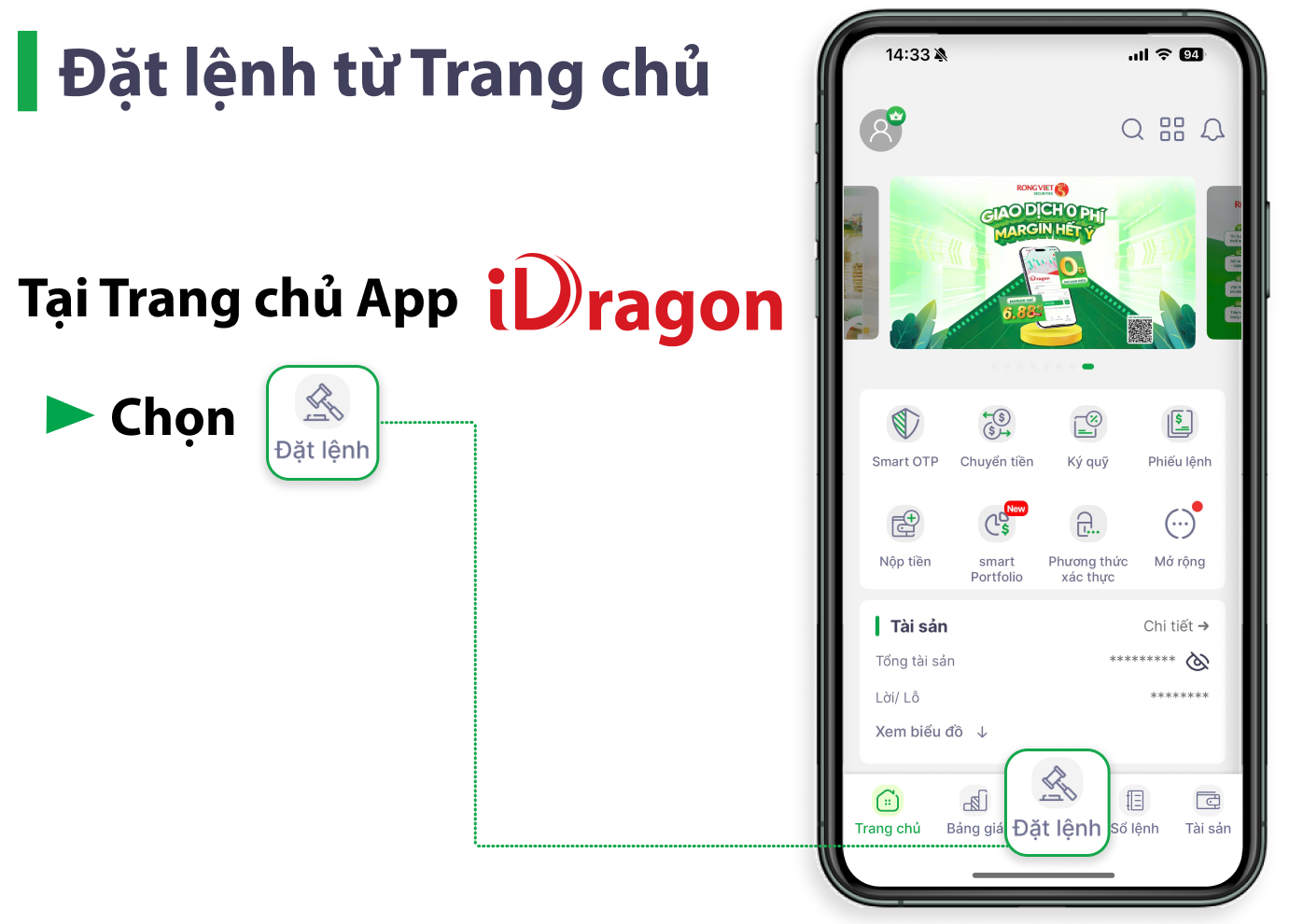
1. Đặt lệnh ở <mark style="color:green;">**Trang chủ**</mark>
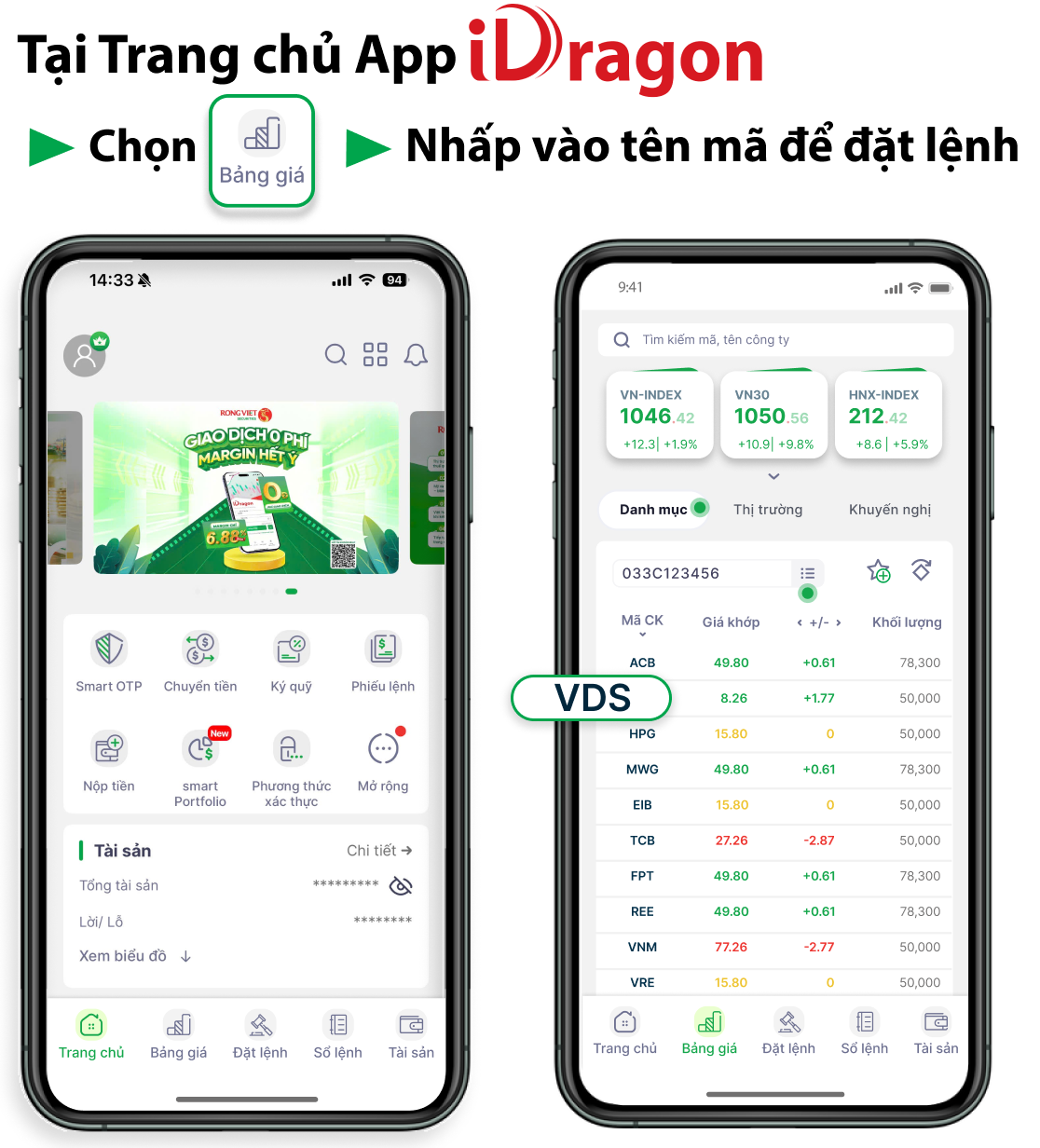
2. Đặt lệnh trực tiếp từ <mark style="color:green;">**Bảng giá**</mark>
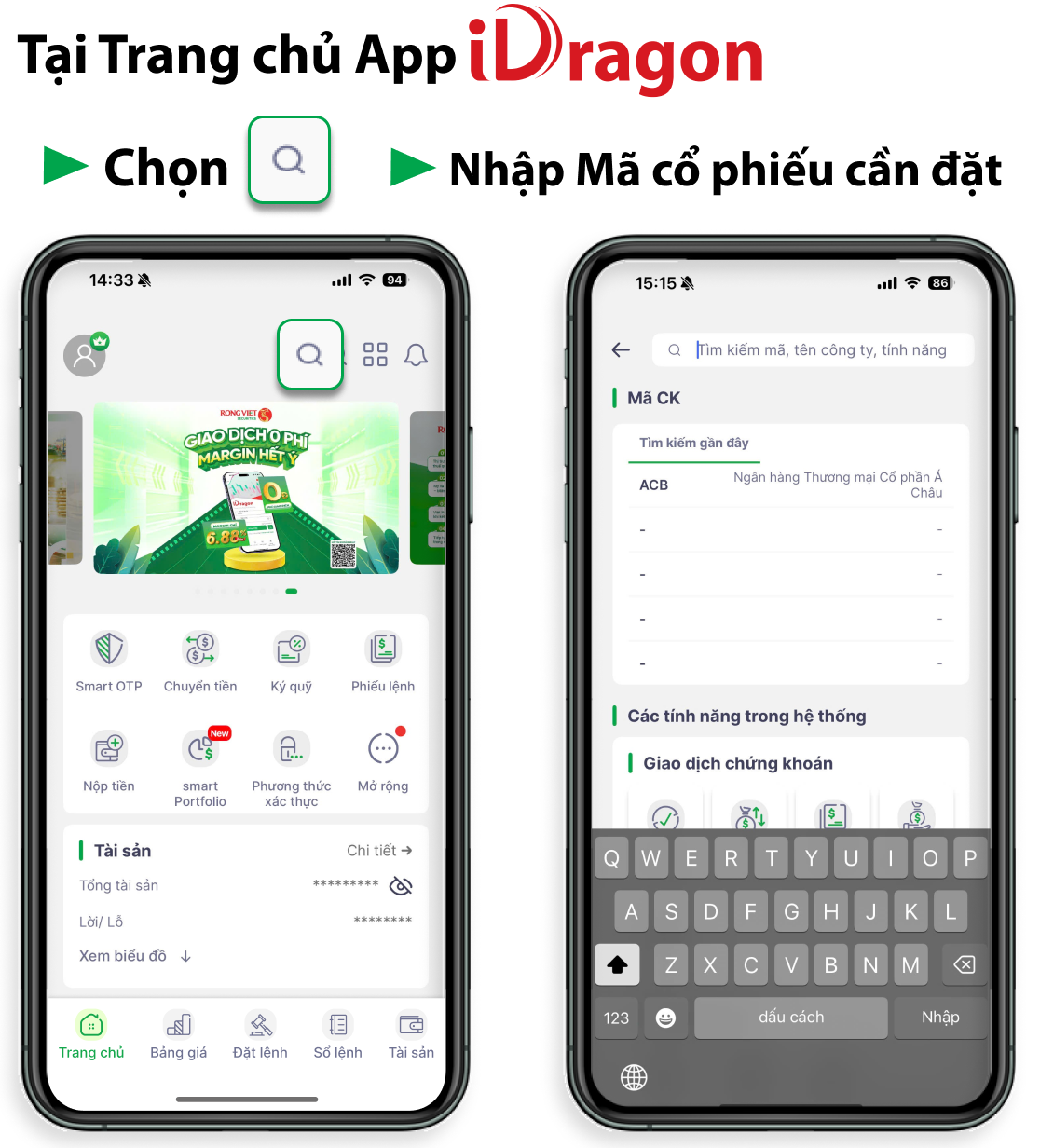
3. Tìm kiếm và đặt lệnh qua thanh <mark style="color:green;">**Tìm kiếm**</mark>
4. Đặt mua tại các <mark style="color:green;">**bản tin khuyến nghị của Rồng Việt**</mark>

* Bảng giá khuyến nghị
* smartTrade
* smartPorfolio
* Bản tin sáng

Dưới đây là hướng dẫn đặt lệnh thường tại iDragon App.

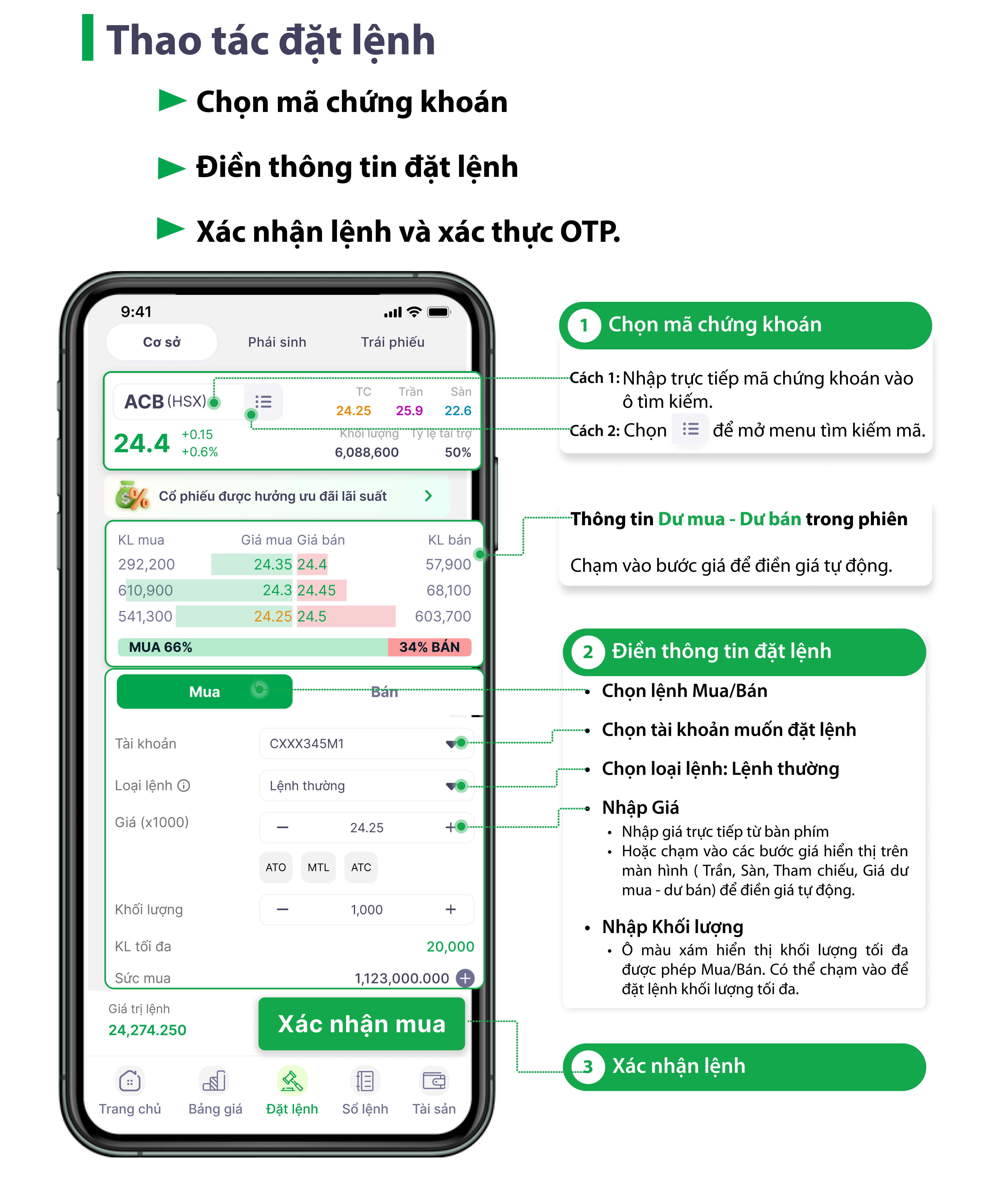
## <mark style="color:green;">1. Hướng dẫn màn hình đặt lệnh</mark>

<figure><img src="https://672161169-files.gitbook.io/~/files/v0/b/gitbook-x-prod.appspot.com/o/spaces%2Fm34HHq3yCwwPqTzkuh7H%2Fuploads%2Fpxkl7GoyDHHdWy1Ylwd5%2Fimage.png?alt=media&#x26;token=a140dd88-1be2-4086-adda-960e57297d70" alt=""><figcaption></figcaption></figure>

{% hint style="success" %}

* **Giá (x1000):** đơn vị giá là 1.000 VND. Ví dụ: để đặt giá 124.300 VND, Quý Khách nhập 124.3.
* **Khối lượng tối đa:** hệ thống tự động tính toán khối lượng tối đa được phép Mua/ Bán của Mã chứng khoán dựa trên Sức mua và Giá đặt.
* **Tỷ lệ tài trợ:** là tỷ lệ % được tài trợ trên Giá trị mua (không bao gồm phí) theo từng mã chứng khoán.
* **Giá trị lệnh:** là giá trị tạm tính của lệnh đặt bao gồm phí.
  {% endhint %}

## <mark style="color:green;">2. Các phương thức tiếp cận giao diện đặt lệnh</mark>

<details>

<summary><mark style="color:green;"><strong>Đặt lệnh từ Trang chủ</strong></mark></summary>

<figure><img src="https://672161169-files.gitbook.io/~/files/v0/b/gitbook-x-prod.appspot.com/o/spaces%2Fm34HHq3yCwwPqTzkuh7H%2Fuploads%2FCCQ0wksW5WEsb76oqmHi%2Fimage.png?alt=media&#x26;token=dbd97431-4a92-4e12-b4f2-c767d8466510" alt=""><figcaption></figcaption></figure>

</details>

<details>

<summary><mark style="color:green;"><strong>Đặt lệnh trực tiếp từ Bảng giá</strong></mark></summary>

<figure><img src="https://672161169-files.gitbook.io/~/files/v0/b/gitbook-x-prod.appspot.com/o/spaces%2Fm34HHq3yCwwPqTzkuh7H%2Fuploads%2FY1rXp9KZxLLtgBxqlLbR%2Fimage.png?alt=media&#x26;token=6e19b32d-3611-418f-8f00-d48ccb07f75e" alt=""><figcaption></figcaption></figure>

</details>

<details>

<summary><mark style="color:green;"><strong>Tìm kiếm và đặt lệnh qua thanh Tìm kiếm</strong></mark></summary>

<figure><img src="https://672161169-files.gitbook.io/~/files/v0/b/gitbook-x-prod.appspot.com/o/spaces%2Fm34HHq3yCwwPqTzkuh7H%2Fuploads%2FTBBtTEr1hODssDT9Ltch%2Fimage.png?alt=media&#x26;token=7de1e565-4be9-4f65-a6f7-fb402a8598ab" alt=""><figcaption></figcaption></figure>

</details>

<details>

<summary><mark style="color:green;"><strong>Đặt mua tại các bản tin khuyến nghị của Rồng Việt</strong></mark></summary>

* Tín hiệu Mua/Bán của smartTrade: [Xem thêm](https://hdsd.vdsc.com.vn/khuyen-nghi-dau-tu/smarttrade#id-4.-huong-dan-dat-lenh-mua-tu-thong-bao-tin-hieu-smarttrade)
* Tín hiệu Mua/Bán của smartPortfolio: [Xem thêm](https://hdsd.vdsc.com.vn/khuyen-nghi-dau-tu/smartporfolio#id-2.-huong-dan-dat-lenh-tu-thong-bao-tin-hieu)
* Khuyến nghị Mua của Bản tin sáng: [Xem thêm](https://hdsd.vdsc.com.vn/khuyen-nghi-dau-tu/bao-cao-phan-tich-cua-rong-viet#huong-dan-dat-lenh-tu-khuyen-nghi-mua-cua-ban-tin-sang-tai-app-idragon)
</details>


---

# Agent Instructions: Querying This Documentation

If you need additional information that is not directly available in this page, you can query the documentation dynamically by asking a question.

Perform an HTTP GET request on the current page URL with the `ask` query parameter:

```
GET https://hdsd.vdsc.com.vn/co-phieu/dat-lenh-thuong.md?ask=<question>
```

The question should be specific, self-contained, and written in natural language.
The response will contain a direct answer to the question and relevant excerpts and sources from the documentation.

Use this mechanism when the answer is not explicitly present in the current page, you need clarification or additional context, or you want to retrieve related documentation sections.